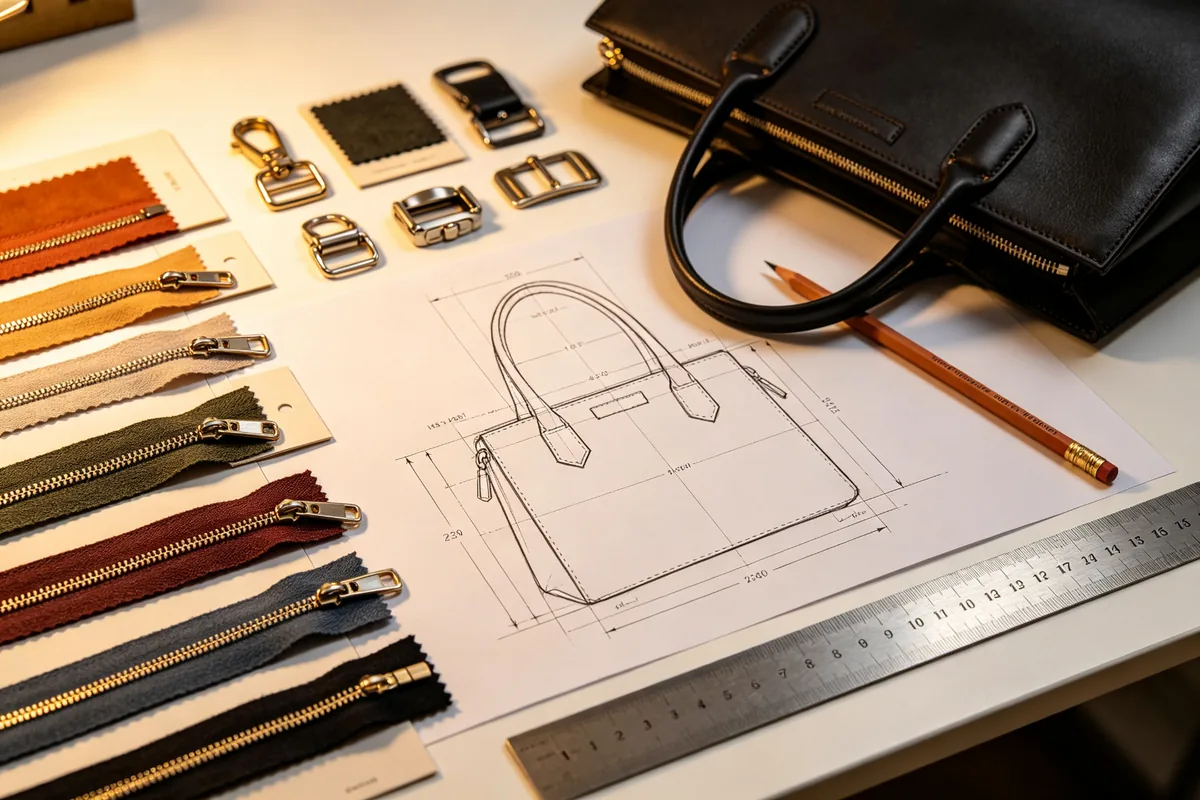
A tech pack is the single most important document between you and your bag factory. It is not a mood board, it is not a fashion illustration, and it is not a rough sketch with a few notes. It is a precise production instruction sheet that tells the factory exactly what to build, what materials to use, and what standards to meet. Get it right and your first sample is close to the final product. Get it wrong and you will spend three months and thousands of dollars on revision after revision.
After producing over 500 custom bag styles for brands across 30 countries, we have seen every type of tech pack, from a single blurry phone photo to a 40-page engineering document. The brands that get to market fastest are not the ones with the most expensive designers. They are the ones who understand what a factory actually needs and provide it in a clear, organized format.
What Is a Tech Pack and Why Your Factory Needs It
A tech pack, short for technical package, is a set of documents that specifies every detail of a product for manufacturing. For bags, it includes technical drawings with measurements, material specifications, color standards, construction details, hardware lists, packaging requirements, and a bill of materials. Think of it as a recipe for your bag. If the recipe says "some flour" and "a little salt," every cook will make something different. If it says "250 grams of bread flour" and "5 grams of sea salt," the result is consistent every time.
Factories need a tech pack for three reasons. First, it allows them to give an accurate quotation. Without material specifications, they will quote based on the cheapest available fabric, and then surprise you with a higher price when you specify the actual material. Second, it reduces sample rounds. A well-prepared tech pack typically results in a usable first or second sample. Without one, expect four to six rounds. Third, it protects you during production. If the factory deviates from the spec, you have a written document to reference when requesting corrections.
Factory perspective: When a buyer sends only a reference image and says "make something like this," the factory has to make at least 15 assumptions about fabric, hardware, stitching, and dimensions. Every assumption is an opportunity for a mismatch. A tech pack eliminates those assumptions.
Anatomy of a Bag Tech Pack: 8 Essential Sections
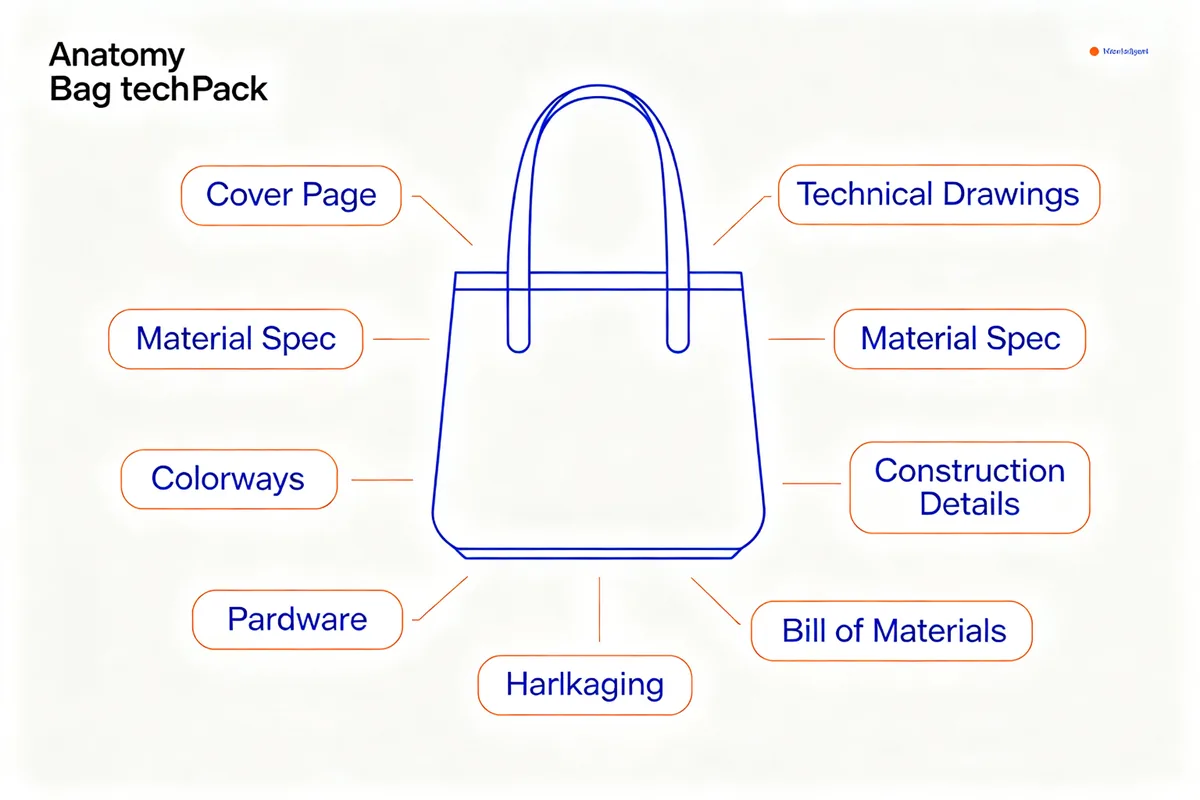
A complete bag tech pack contains eight sections. You do not need all eight for your first draft, but the final version sent to the factory should include every one. Missing sections lead to questions, and questions lead to delays.
1. Cover Page
The cover page identifies the style. Include the style name (for example, "Urban Commuter Backpack"), a style number (your internal reference, such as "BP-2026-001"), the version number, the date, and your company name. This sounds basic, but when a factory is working on 20 styles simultaneously, a missing style number means your tech pack gets filed under the wrong project.
2. Technical Drawings
Technical drawings, also called flats or spec drawings, are line drawings that show the bag from multiple angles. At minimum, include front, back, side, and bottom views. For complex bags, add an internal view showing pocket layout. Every drawing must have measurement annotations. A drawing without dimensions is a decoration, not a technical document.
3. Material Specification
This section lists every material used in the bag. For the outer fabric, specify the fiber composition (100% nylon 6,6), the weave (ripstop), the weight in grams per square meter (210D or 420D), any coating (PU or PVC backing), and the color with a Pantone number. Do the same for lining, interfacing, foam, and any other fabric component.
4. Colorways
If you are producing the same style in multiple colors, list each colorway with its Pantone references for fabric, zipper, hardware, and stitching. A common mistake is specifying only the fabric color and assuming the factory will match the zipper and hardware. They will not. They will use whatever is in stock, which may be a slightly different shade.
5. Construction Details
Construction details specify how the bag is put together. Include the stitch count per inch (7 to 9 stitches per inch is standard for most bags; 10 to 12 for high-tension areas like strap attachments), the seam allowance (usually 1 cm or 3/8 inch), the edge finishing method (binding, folding, or overlocking), and any reinforcement requirements (bartack at stress points, double stitching at the bottom).
6. Hardware and Accessories
List every non-fabric component: zippers (brand, size, length, tooth color, tape color), buckles (material, finish, dimensions), D-rings, snap buttons, rivets, Velcro, elastic, webbing, and labels. For zippers, specify the brand (YKK is the industry standard, SBS is a common lower-cost alternative), the size (#3 for small pockets, #5 for main compartments, #8 for heavy-duty gear), and the length in centimeters.
7. Packaging and Labeling
Specify the hang tag design and material, the care label content and language, the poly bag size, the carton dimensions, the carton marking (PO number, style number, quantity, country of origin), and any special packaging requirements (tissue paper, silica gel packets, cardboard inserts). This section is often skipped, and then the goods arrive without hang tags or in the wrong carton size.
8. Bill of Materials (BOM)
The BOM is a table that lists every component, the quantity used per unit, the unit cost, and the total material cost. It is the factory's reference for purchasing and your reference for cost verification. A good BOM includes a column for the supplier or source of each material, which helps when the factory needs to reorder.
Bag Measurements: The Critical Numbers Your Factory Needs
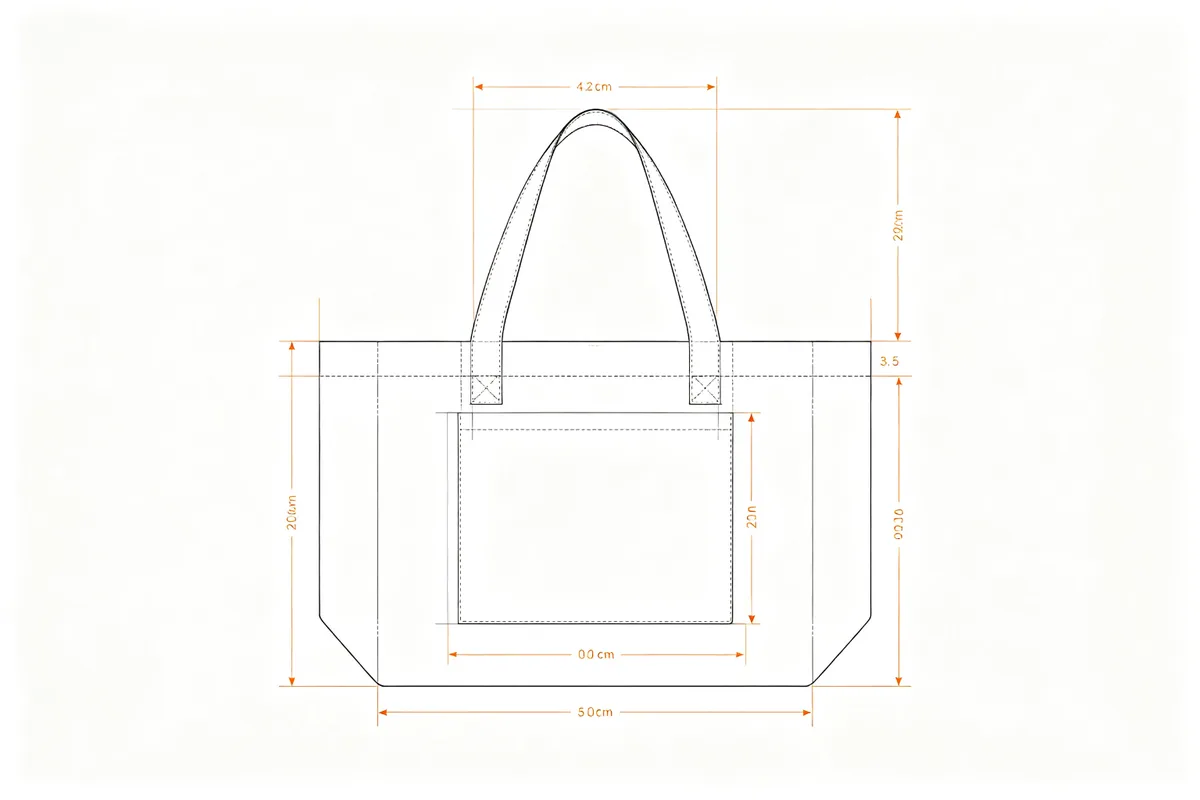
Measurements are the backbone of a tech pack. A difference of 1 centimeter in strap length can make a bag comfortable or unwearable. A difference of 2 centimeters in height can change whether a 15-inch laptop fits inside. Every measurement must be a number, never a description like "long strap" or "medium size."
For every bag style, include these standard measurements:
| Measurement | Description | Tolerance |
|---|---|---|
| Top Width | Width of the bag opening, measured from edge to edge | ±0.5 cm |
| Bottom Width | Width of the bag base, which may differ from top width | ±0.5 cm |
| Height | Vertical distance from bottom to top edge, excluding straps | ±0.5 cm |
| Gusset (Side) Width | Depth of the bag, measured at the side panel | ±0.3 cm |
| Handle Drop | Distance from top of handle to top of bag (for hand carry) | ±1 cm |
| Shoulder Strap Length | Total length of shoulder strap, adjustable range if applicable | ±2 cm |
| Strap Width | Width of the shoulder or handle strap | ±0.2 cm |
For backpacks, add back length (measured from top of back panel to bottom), chest strap length, and hip belt length. For wheeled duffels, add wheel height, telescopic handle extended length, and handle grip diameter. For cosmetic bags, add the internal pocket dimensions and the mirror size if included.
Always specify the tolerance. A tolerance of ±0.5 cm means the factory can deliver a bag that is 0.5 cm larger or smaller than the specified dimension without it being considered a defect. Without a stated tolerance, the factory may hold itself to an impossible standard and reject good units, or conversely, deliver bags that are visibly the wrong size and claim they are within an unwritten standard.
Material Specification Sheet: Fabrics, Zippers, and Hardware
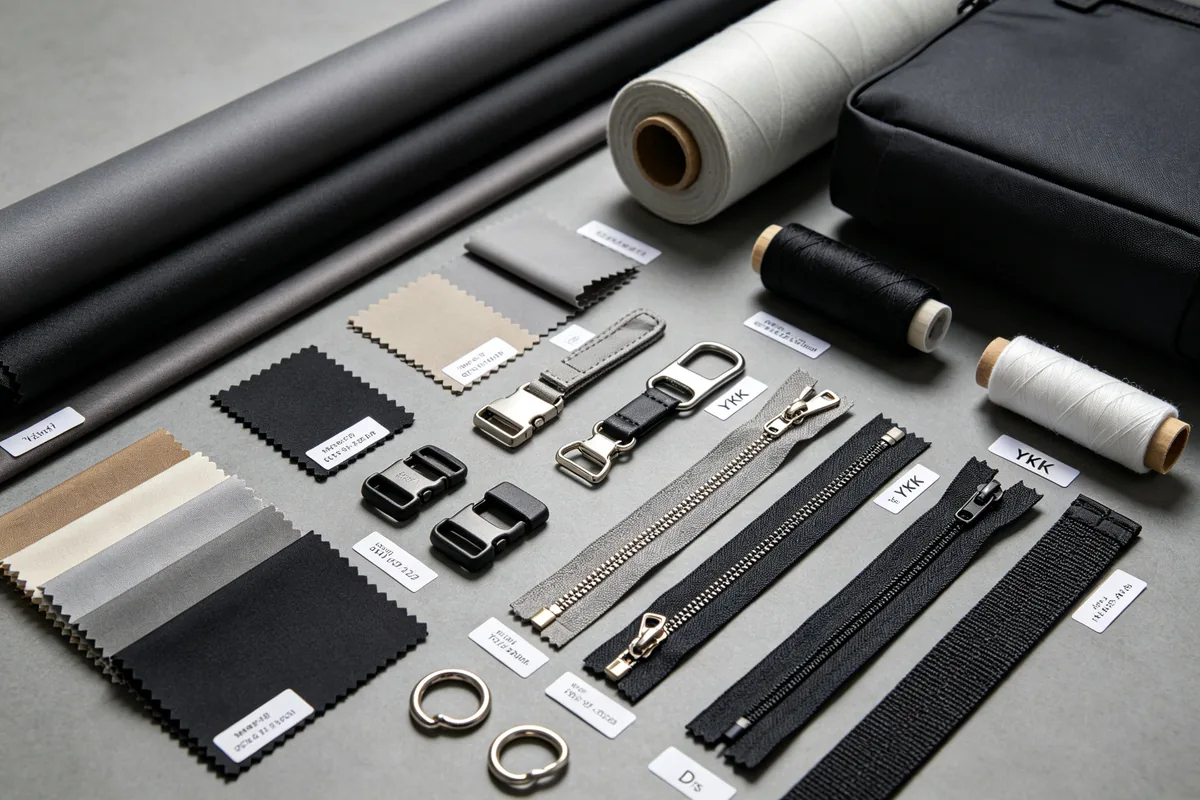
The material specification sheet is where most tech packs fail. Buyers tend to write "nylon fabric" or "black zipper" and assume the factory will understand what they mean. The factory will understand, but they will use the cheapest version that matches your vague description. If you want 420D nylon with a PU coating and a water-repellent finish, you must write exactly that.
Fabric Specifications
For every fabric in the bag, list the following: fiber composition (100% polyester, 100% nylon 6,6, cotton canvas, recycled PET), the denier or weight (210D, 420D, 600D, 16 oz canvas), the weave or finish (ripstop, dobby, plain weave, diamond pattern), any coating or backing (PU coating, PVC backing, TPU lamination), the color with Pantone number, and the approved mill or supplier if you have one.
Zipper Specifications
Zippers are the most common point of failure in bags, so specify them carefully. Include the brand (YKK, SBS, YCC, or factory standard), the type (nylon coil, metal teeth, plastic molded, waterproof), the size (#3 for small pockets, #5 for main compartments, #8 for heavy-duty, #10 for gear bags), the length in centimeters for each zipper, the tooth color, the tape color, the slider type (auto-lock, non-lock, reversible), and the puller design (custom shape, brand logo, standard). For waterproof bags, specify a waterproof zipper with a PU-coated tape and a sealed slider.
Hardware Specifications
For every metal or plastic component, specify the material (zinc alloy, iron, stainless steel, POM plastic), the finish or plating (shiny nickel, matte black, gunmetal, antique brass, rose gold), the dimensions in millimeters, and the quantity per bag. For buckles, specify the type (side release, ladder lock, cam buckle, magnetic snap). For D-rings and O-rings, specify the inner diameter and the wire thickness. For rivets, specify the cap diameter and the post length.
Thread and Stitching
Specify the thread material (polyester spun, polyester filament, nylon, bonded nylon), the thread size (Tex 40 for general sewing, Tex 70 for heavy fabric, Tex 90 for webbing), the color with a thread color card reference (Gutermann, Madeira, or factory color card), and the stitch count per inch. For most bag fabrics, 7 to 9 stitches per inch is standard. For webbing and heavy canvas, 6 to 7 stitches per inch prevents the needle from perforating the material. For fine fabrics like satin or silk lining, 10 to 12 stitches per inch is appropriate.
How to Annotate Technical Drawings for Bag Production
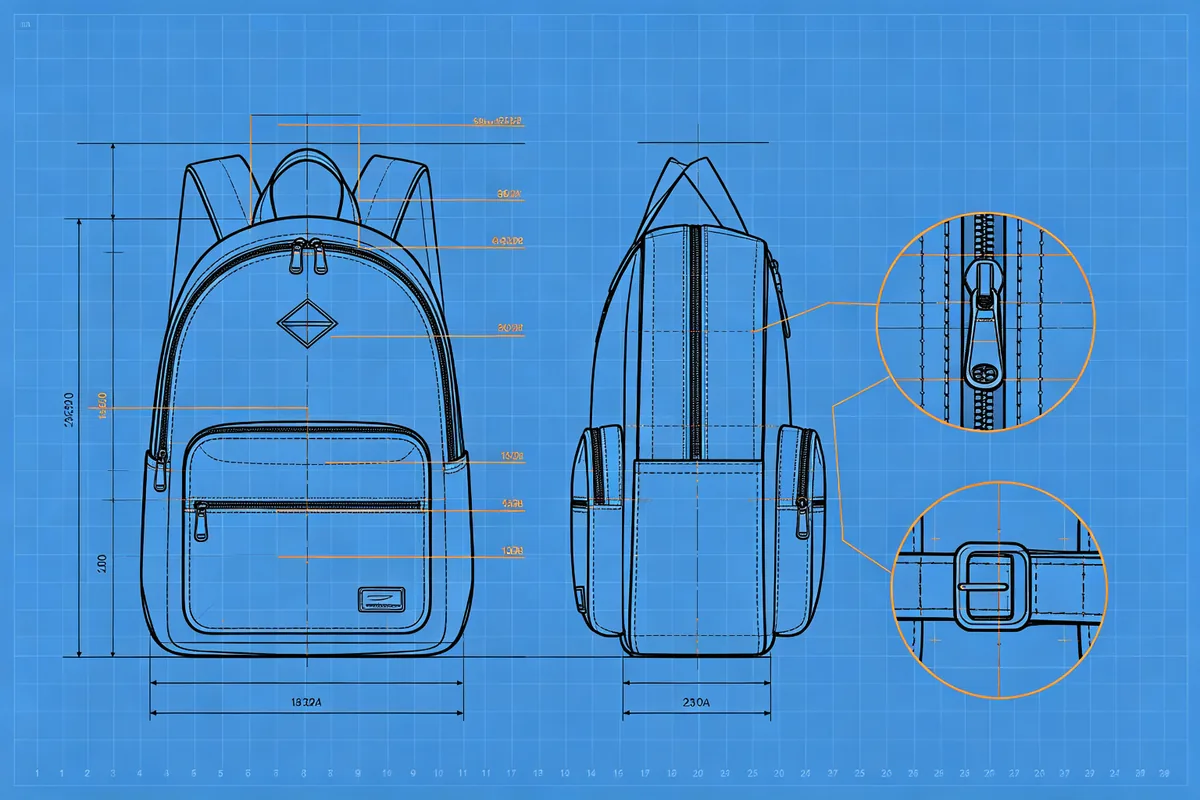
Technical drawings are the visual core of the tech pack. A good drawing communicates more than a page of text. The key is annotation: every feature, dimension, and construction detail must be clearly marked on the drawing so the pattern maker and sample maker can read it without asking questions.
View Requirements
Every bag needs at least four views: front, back, side, and bottom. The front view shows the main face, pockets, logo placement, and zipper positions. The back view shows the back panel, any back pockets, and strap attachment points. The side view shows the gusset depth, profile shape, and any side pockets. The bottom view shows the base shape, bottom studs or feet, and how the side panels join the base. For bags with complex internal organization, add an internal view showing pocket layout, dividers, and laptop sleeve dimensions.
Annotation Method
Use leader lines (thin lines with an arrow at one end) to point from a number or label to the specific feature on the drawing. Place the numbers around the perimeter of the drawing, not on top of it, so the bag shape remains clear. Each number corresponds to a detail in the specification table next to the drawing. For measurements, use dimension lines with arrowheads at both ends and the measurement number in the middle. Always include the unit (cm or inches) and be consistent throughout the tech pack.
Detail Callouts
For small features that are hard to see on the main drawing, use detail callouts: draw a circle around the feature on the main drawing, draw a line to a larger version of that feature placed nearby, and annotate the larger version. Common detail callouts for bags include: the zipper slider and puller, the buckle mechanism, the logo embroidery or print, the strap attachment with bartack reinforcement, the bottom corner construction, and the edge binding finish.
Software Options
Adobe Illustrator is the industry standard for technical fashion drawings. It offers precise vector drawing, custom brushes for stitch lines, and the ability to create reusable symbols for hardware. CorelDRAW is widely used in Asian manufacturing hubs and offers similar capabilities at a lower cost. For cloud-based collaboration, Techpacker provides pre-built tech pack templates and lets factories comment directly on each section. If you are on a budget, Inkscape (free, open-source) can produce technical drawings, though it lacks the fashion-specific brushes of Illustrator.
6 Common Tech Pack Mistakes That Delay Production
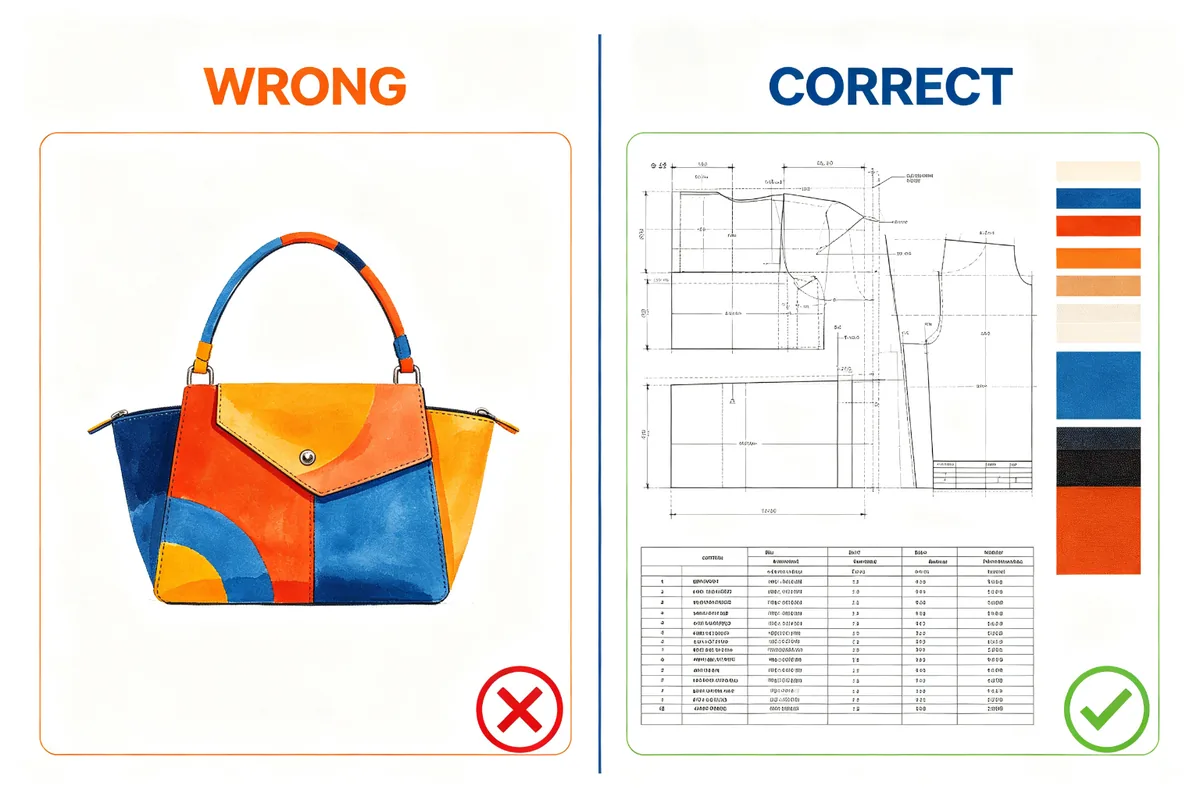
Most production delays trace back to a tech pack mistake. These are the six most common errors we see, and how to avoid them.
Mistake 1: Sending Only a Reference Image
A photo of a bag you like is not a tech pack. The factory cannot measure a photo accurately, cannot identify the fabric weight, and cannot tell if the strap is 3 cm or 5 cm wide. If you only have a reference image, the first step is to create a technical drawing from it and take measurements from a similar bag you already own.
Mistake 2: Vague Material Descriptions
"Good quality nylon" is not a material spec. Neither is "black zipper" or "metal buckle." The factory will interpret "good quality" as "the cheapest material that does not fall apart." Specify the denier, coating, brand, size, and finish for every material. If you are unsure what to specify, ask the factory for three material options with price points and choose one.
Mistake 3: Missing Tolerances
Without stated tolerances, every measurement is open to interpretation. The factory may consider a 2 cm deviation acceptable, while you consider it a defect. State tolerances for every measurement category: ±0.5 cm for critical dimensions (width, height, gusset), ±1 cm for strap lengths, ±0.2 cm for strap width and hardware dimensions. This gives the factory a clear standard and prevents arguments during quality inspection.
Mistake 4: No Version Control
When you revise a tech pack, label it with a new version number and date. Do not overwrite the old file. If the factory is working from version 2 and you send version 3 without marking it clearly, they may continue cutting from the old version. Always include the version number on the cover page and in the file name (for example, "BP-2026-001_TechPack_V3_2026-08-28.pdf").
Mistake 5: Ignoring Packaging Requirements
Many brands spend weeks perfecting the bag design and then forget to specify packaging. The result: goods arrive in plain poly bags with no hang tags, or the cartons are too large for your warehouse shelving. Specify hang tag material and design, care label content, poly bag thickness (at least 0.04 mm to prevent tearing), carton dimensions, and carton marking. If you require FOB shipping marks, include them in this section.
Mistake 6: No Sign-Off Process
Before production begins, both you and the factory should sign off on the final tech pack and the approved sample. This means a written confirmation (email is fine) that the tech pack version X and sample number Y are the approved standards for production. Without this, the factory may make last-minute changes to reduce cost, and you have no document to reference when the goods do not match your expectations.
Tech Pack Template: Your First Version Does Not Need to Be Perfect
Many first-time brands get stuck trying to create the perfect tech pack and never send anything to the factory. The truth is that your first version does not need to be perfect. It needs to be complete enough for the factory to understand the design and give you a quotation. You will refine it through the sample process.
For your first version, focus on these five elements: a front and back technical drawing with key measurements, the main fabric specification, the zipper brand and size, the hardware list, and a rough BOM. That is enough to get a quotation and a first sample. After you receive the first sample, you will add the missing details: precise tolerances, construction notes, packaging requirements, and updated measurements based on the physical sample.
Practical tip: If you already have a physical sample of a similar bag, measure it and use those measurements as the starting point. This is faster and more accurate than guessing dimensions from a photo. Bring the sample to a tailor or leather worker if you need help identifying construction details.
Here is a simplified tech pack structure you can use for your first version:
This draft takes about 30 minutes to prepare and is enough for a factory to provide a quotation and start a first sample. You will add the remaining sections (colorways, construction details, packaging, precise tolerances) after reviewing the first physical sample.
How to Revise a Tech Pack with Your Factory

The tech pack is a living document. It evolves through the sampling process. The key is to manage revisions efficiently so they do not cause confusion or delays.
The Factory Review
When you send a tech pack to a factory, they will review it and come back with questions. Common questions include: "This fabric has a 1,000 yard minimum, can we substitute a similar fabric with a lower minimum?" "This zipper size is unusual, can we use #5 instead of #4?" "This construction method requires a special machine, can we simplify it?" "The MOQ for this custom hardware is 5,000 pieces, can we use a standard buckle?" These are not objections. They are the factory helping you identify potential cost and timeline issues before production begins.
Revision Protocol
When you make changes, follow this protocol: update the version number on the cover page, highlight all changes in red or yellow on the drawings, add a revision history table at the end of the tech pack listing each change, the date, and the reason, and send the complete revised file (not just the changed pages). Never send changes in a separate email or chat message without updating the tech pack itself. The factory works from the tech pack document, not from your email history.
The Sign-Off
Once the sample is approved and the tech pack is finalized, obtain written sign-off from the factory. This can be a simple email confirming: "We confirm that tech pack version 3, dated August 28, 2026, and sample number 2 are the approved standards for production of style BP-2026-001." This confirmation is your protection if the production goods do not match the approved standard. It also prevents the factory from making unapproved changes during production to reduce cost.
For more on the production process after the tech pack is approved, read our step-by-step guide to getting custom bags made. If you are still selecting a manufacturer, our guide to choosing a bag manufacturer covers the questions to ask and the red flags to watch for. To understand how the tech pack affects pricing, see our custom bag cost breakdown.
Frequently Asked Questions
Do I need a tech pack for a simple tote bag?
Direct Answer: Yes — even a simple tote needs a tech pack. Without one the factory guesses fabric weight, strap length, and stitching standard, which usually produces a wrong sample. A basic tote pack takes about 30 minutes and saves 2-3 sample revision rounds.
- Need: Even for a simple tote
- Prep Time: ~30 minutes
- Saves: 2-3 sample revision rounds
Yes. Even a simple tote bag needs a tech pack. Without one, the factory will guess the fabric weight, strap length, and stitching standard, which almost always leads to a sample that does not match your expectations. A basic tech pack for a tote takes about 30 minutes to prepare and saves 2 to 3 rounds of sample revisions.
Can the factory create the tech pack for me?
Direct Answer: Some factories offer paid tech-pack creation for $50-$200 per style, but you must review and sign off the final version — they may simplify specs to cut their own production cost. Verify every detail matches your requirements before approving bulk.
- Factory Service Cost: $50-$200 / style
- Your Duty: Review and sign off
- Watch For: Over-simplified specs
Some factories offer tech pack creation as a paid service, typically charging $50 to $200 per style. However, you should always review and sign off on the final version. The factory may simplify specifications to reduce their production cost, so you need to verify that every detail matches your requirements before approving production.
How much does a professional tech pack cost?
Direct Answer: Freelance technical designers charge $100-$400 per style (simple tote at the low end, multi-compartment backpack up to $300-$500); agencies bill $500-$1,500. DIY with Illustrator or Techpacker is also viable.
- Freelancer: $100-$400 / style
- Complex Backpack: $300-$500
- Agency: $500-$1,500
- DIY Tools: Illustrator, Techpacker
If you hire a freelance technical designer, expect to pay $100 to $400 per style depending on complexity. A simple tote is on the lower end, while a multi-compartment backpack with internal organization can cost $300 to $500. Design agencies charge $500 to $1,500 per style. You can also create it yourself using Adobe Illustrator or online tools like Techpacker.
How long does it take to create a tech pack?
Direct Answer: A first-timer spends 3-5 hours on a simple bag style; an experienced tech designer finishes in 1-2 hours. Technical drawings and the material spec sheet take the longest — measuring an existing prototype can halve the time.
- First-Timer: 3-5 hours
- Experienced: 1-2 hours
- Shortcut: Measure an existing prototype
A first-time creator typically spends 3 to 5 hours on a simple bag style. An experienced technical designer can complete one in 1 to 2 hours. The most time-consuming parts are creating accurate technical drawings and compiling the material specification sheet. If you already have a prototype, you can measure it directly and cut the time in half.
What software do professional bag designers use for tech packs?
Direct Answer: Adobe Illustrator is the industry standard for bag technical drawings and tech-pack layout, with CorelDRAW common in Asian factories. For cloud collaboration, Techpacker and Boconi let factories comment inline; Excel or Sheets handles the bill of materials.
- Industry Standard: Adobe Illustrator
- Asia Hub Tool: CorelDRAW
- Collaboration: Techpacker, Boconi
- BOM: Excel / Google Sheets
Adobe Illustrator is the industry standard for technical drawings and tech pack layout. Some designers use CorelDRAW, especially in Asian manufacturing hubs. For cloud-based collaboration, Techpacker and Boconi are popular because they let factories comment directly on specific sections. Excel or Google Sheets is commonly used for the Bill of Materials.
Ready to start your custom bag project? Send us your tech pack (even a draft version) and we will provide a free quotation within 8 Hours. Our team can also help you refine an incomplete tech pack and identify cost-saving material alternatives. Contact us today to get started.